Stereo panning (X)
Drag left or right for pan coordinates from −1.0 to +1.0, with psychoacoustic width expansion and host DAW pan-scale translation.

 To register on the visistage website/app you either need to use your exisitng Woo ID or create a new one (see below).
.png)
VisiStage V2
3D stage mixer, analog strip, and shared room physics. Built for the whole session, not one hero track.
01
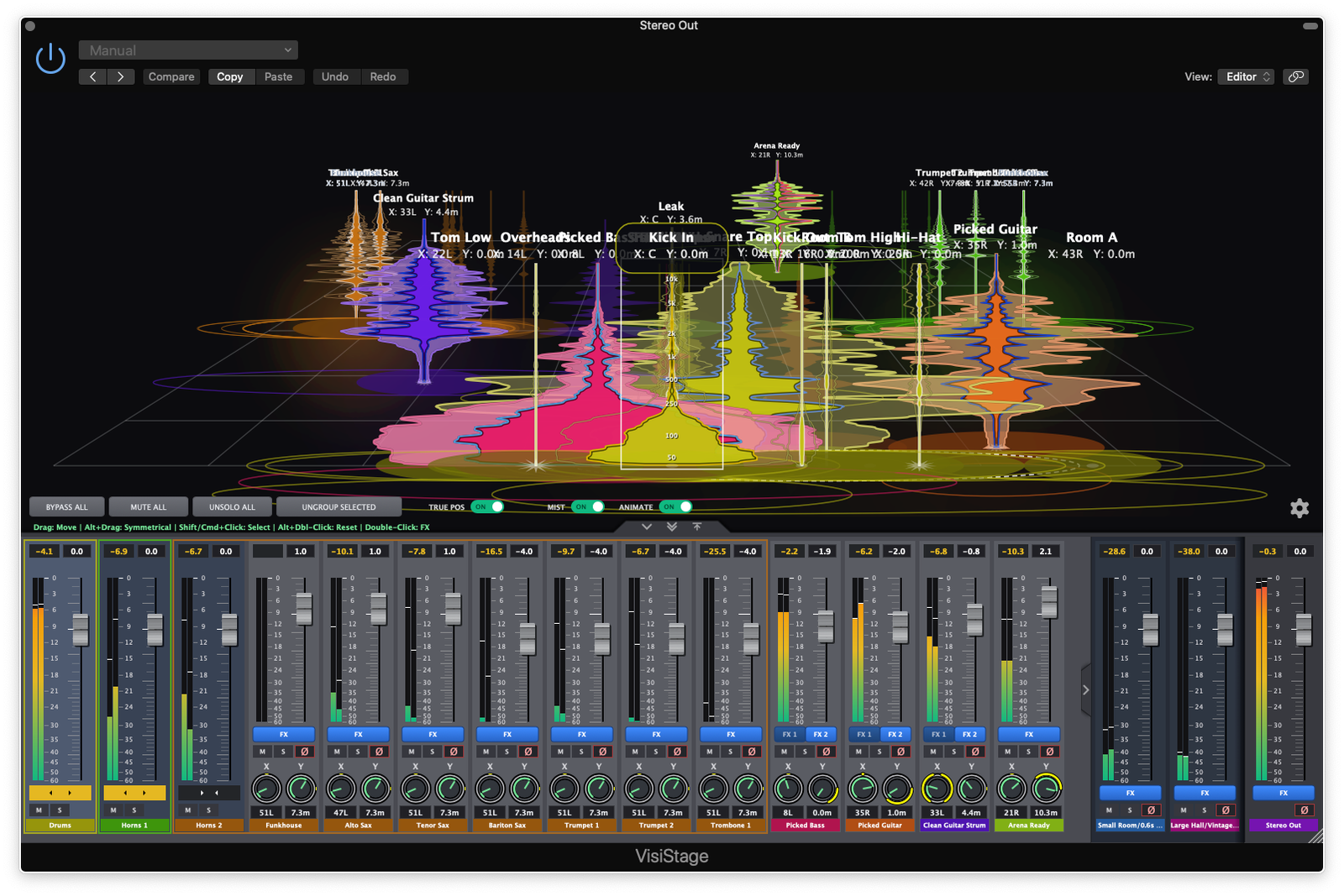
The central workspace of VisiStage V2 is an interactive 3D perspective grid that maps your session as physical audio objects in a shared acoustic environment. A 1,024-track lock-free telemetry hub at 60Hz gives every node continuous spatial feedback and real-time spectral analysis.
Drag left or right for pan coordinates from −1.0 to +1.0, with psychoacoustic width expansion and host DAW pan-scale translation.
Drag deeper into the grid (0.0–1.0) to calculate distance attenuation, air absorption, and early-reflection timing.
Readouts such as X: 24L Y: 12.5m float beneath each icon, switching between metres, yards, or feet.
Hold Option/Alt while dragging to mirror selected tracks across the centre line for instant stereo pairs.
Handles on each node’s floor footprint adjust Stereo Width and Acoustic Presence on the canvas.
Push Stage Scale past the Studio baseline (1.00) and hard-panned instruments stay wide at the wings, even deep in the room.
We have developed a whole visual language for the track EQ Live Icon to make it quick and easy to tell exactly what is happening in real-time to that track at a glance.
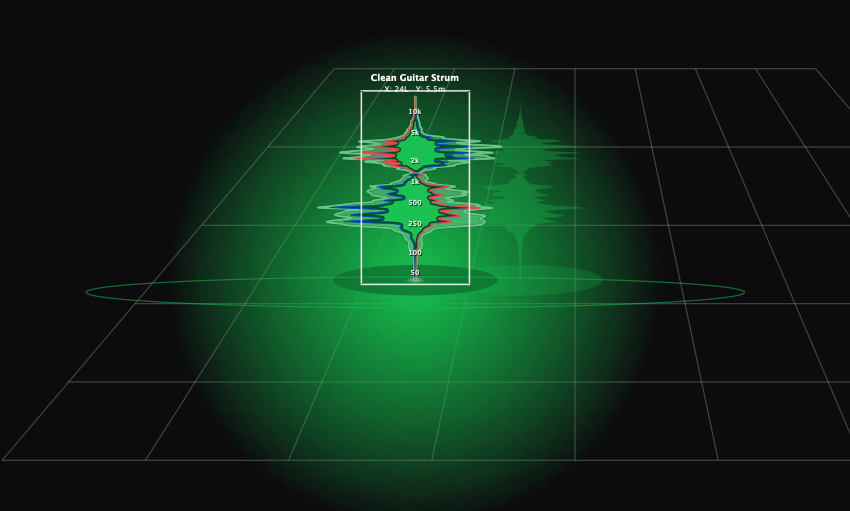
A fluid 128-slice spectrum from a 4096-point FFT expands around the node to show frequencies that are actually playing.
A translucent envelope holds peaks. When dynamics are on, the ghost pulses with real-time compressor gain reduction.
See where the signal is actually sounding versus where you placed it. Toggle with TRUE POS.
Inner disk = low-frequency RMS weight. Outer ring = stereo width, collapsing to a dashed outline if correlation drops below zero.
The outer rim also controls and displays the stereo width and presence (push/pull) of the track.
Visual footprint uses post-fader RMS × fader position, so equally loud tracks occupy equally large space.
A central starburst flashes with real-time peak-to-RMS energy. This immediate visual feedback highlights sharp, overly dynamic transients, allowing you to quickly spot and tame harsh peaks using Transient Guard or Auto-Calibrate Compressor before they eat up your master headroom.
Ambient floor haze behind distant sources, proportional to reflection energy. Toggle with MIST.
Active compression triggers an ultra-bright, luminous neon wash inside the peak-hold ghost shell. The ghost's rim outline dynamically thickens and increases in contrast to ensure even 1-2dB of gain reduction pops visually off the screen.
Increasing saturation drive illuminates the icon's core with an inner-stroke heat glow. The glow color distinctly matches the active hardware profile, such as Neon Gold for Neve, Crimson for Tube, or Cyan/Pink for SSL.
Applying phase rotation twists the 128-bin FFT shape into a 3D ribbon. A solid red phase tracer line also appears across the core body to visually flag active phase manipulation.
When the signal drops below the noise gate threshold and is fully masked, the live audio auras disappear and the track's text label dims to grey, instantly indicating silence.
Drag inside the frame to move. Drag the left or right edge to scale volume.
50 Hz at the base to 10 kHz at the tip, drawn inside the active selection box.
Click to focus, Cmd/Ctrl to cherry-pick, Shift for sections, or drag empty stage for a marquee.
Hold Shift on one volume handle to scale gain on every selected track at once.
02
Behind the canvas, background DSP simulates console physics, component tolerances, and analog non-linearities — character across the whole session, not a single boutique channel.
Each instance gets a unique hardware micro-seed that shifts EQ centres, Q, and saturation DC bias by ±1.5%. Stacked across a session, that variance builds 3D width. Master/Stereo Out is excluded so the image stays centred.
Transients that rise faster than a transformer can follow get rounded. The limit tightens as Drive increases. Tape and Neve stay heavy; SSL and Digital stay snappy.
Limitactive = (Limitbase × Modifier) / (1 + (Drivegain × 0.05))
Heavy gain reduction automatically lengthens release so the compressor doesn’t pump.
Releaseadaptive = Releasebase × (1 + (GRdB × 0.15))
On the Trevor Horn SSL profile, Q tightens as gain deepens — broad at low settings, surgical at extremes.
Qeffective = Qbase × (1 + 0.08 × |GaindB|)
Polyphase IIR doubles the sample rate before saturation so new harmonics form above Nyquist, then get filtered before downsample.
Midpoints sit where music lives: 1 kHz for EQ/Colour, 5 kHz for HF rolloff, 10 ms attack, 150 ms release.
03
Double-click a track node or hit its [FX] button. A 130 ms 3D card-flip drops you into Focus Mode — the hero track becomes a full analog strip.
Every DSP module in VisiStage is designed for ultimate efficiency, remaining completely linear and consuming zero CPU until you actually need it. Modules only wake up when you actively push their controls—like moving an EQ Gain off zero, turning up Saturation Drive, lowering Compressor or Gate Thresholds, or shifting a Phase Rotation. When it's time to critically evaluate your mix, dedicated bypass switches for every single effector let you instantly A/B test your sculpted tone against the dry signal without losing your carefully dialed-in knob positions.
Sculptor mode helps you stay in a creative mind set—molding your sound through physical tone shaping controls that visualize what is happening to the sound.
Shape parameters on 3D geometry: EQ handles, Glass Pinch Walls, Donut Collars for drive/makeup, All-Pass phase ribbons, and more.
Engineer mode gives you all the typical graphs, charts, meters and controls you would expect and more.
Analytical dashboard: 8-band transfer curves, 3-second GR history, GR VU, goniometer/Lissajous, Phase Correlation Index, and more.
A central pill switch flips the workspace with specular lighting and dimming.
Five DSP blocks drag on vertical HUD tabs. Signal flow updates with no clicks or dropouts.
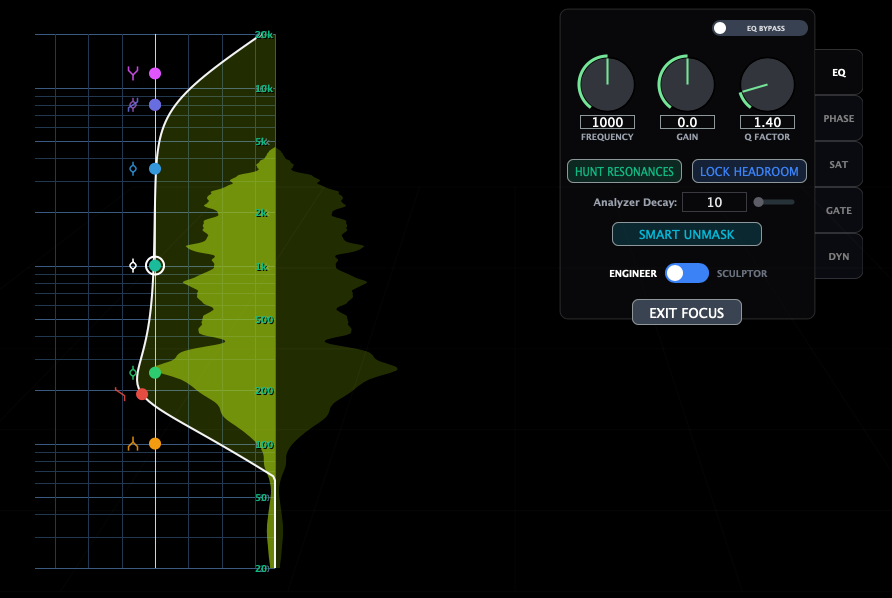
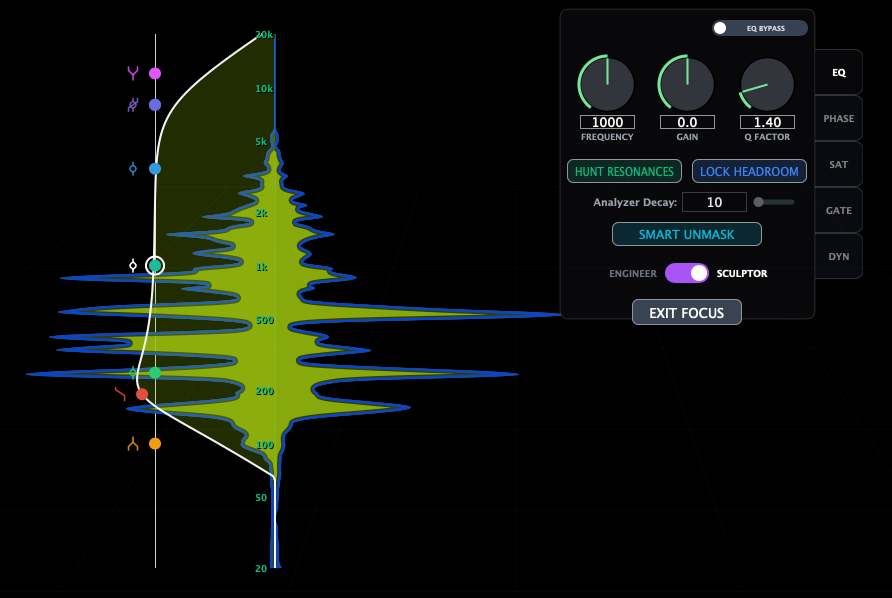
Filter Q tightens as boosts or cuts deepen, keeping the midrange transparent.
High-pass, low shelf, peak/bell, high shelf, and low-pass across all eight bands.
Drag the 3D curve for frequency and gain. Mouse wheel sets Q. HPF/LPF stay at 0 dB while X-drag sets resonance.
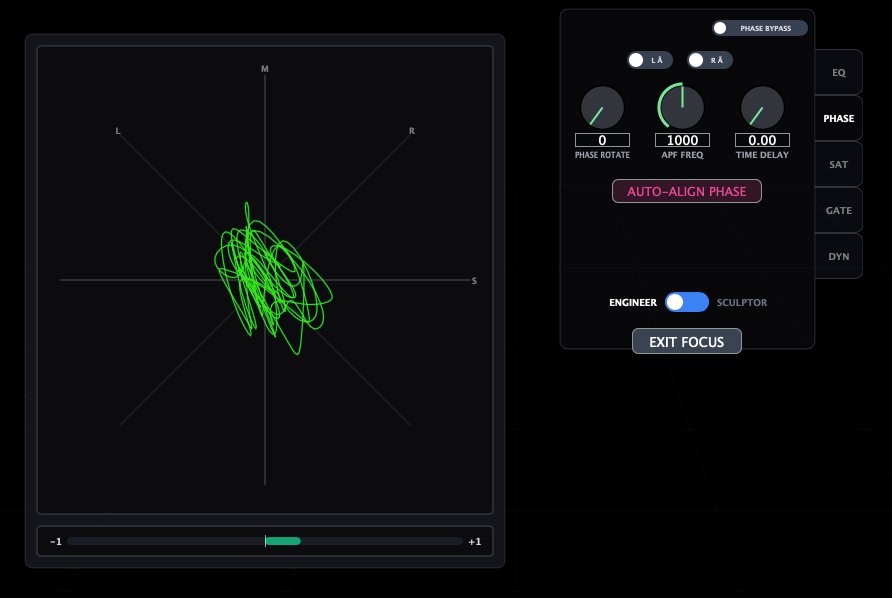
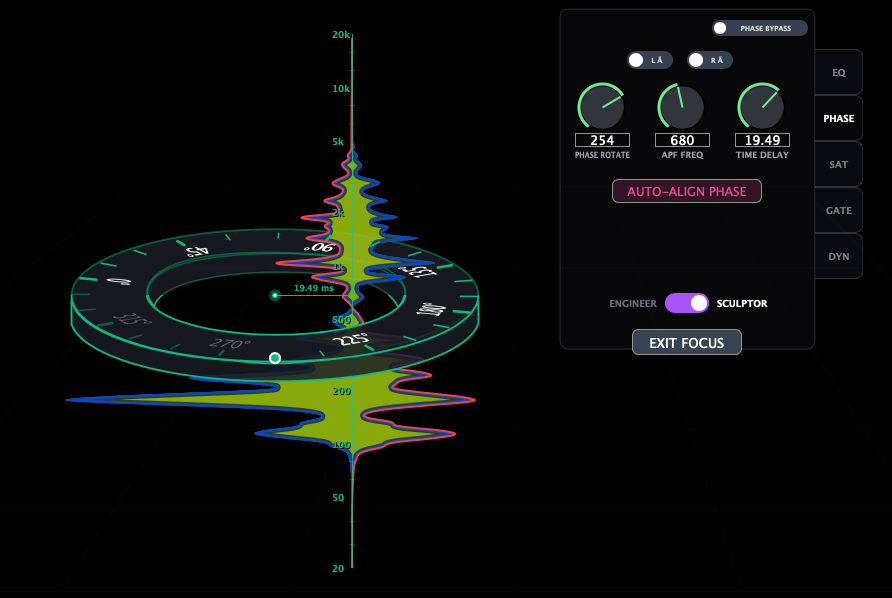
Independent Left and Right switches: L Ø / R Ø.
Continuous 0°–360° via a sweepable all-pass (20 Hz–20 kHz) for acoustic cancellation.
0.00–30.00 ms fractional delay for multi-mic drums or amp stacks.
A twisted 3D ribbon runs along the node whenever rotation or delay is active.
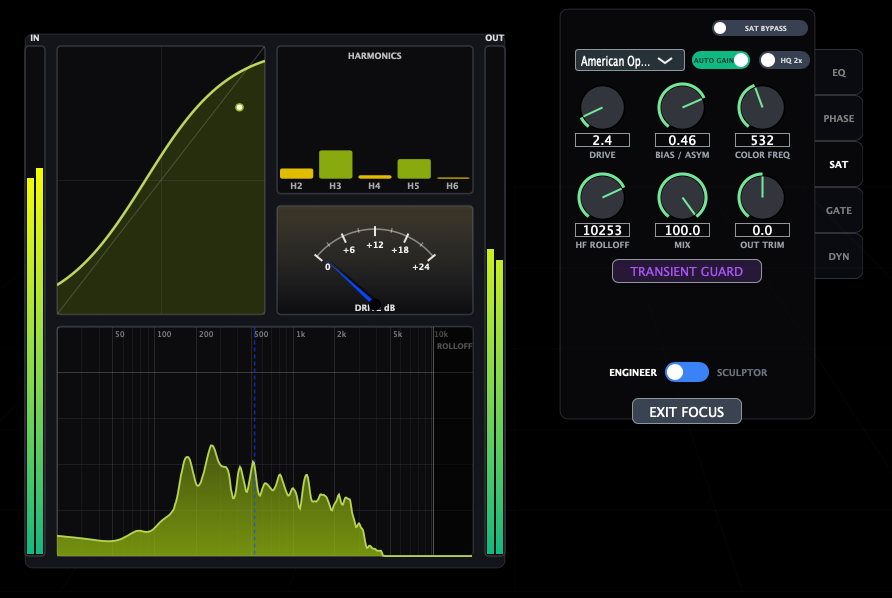
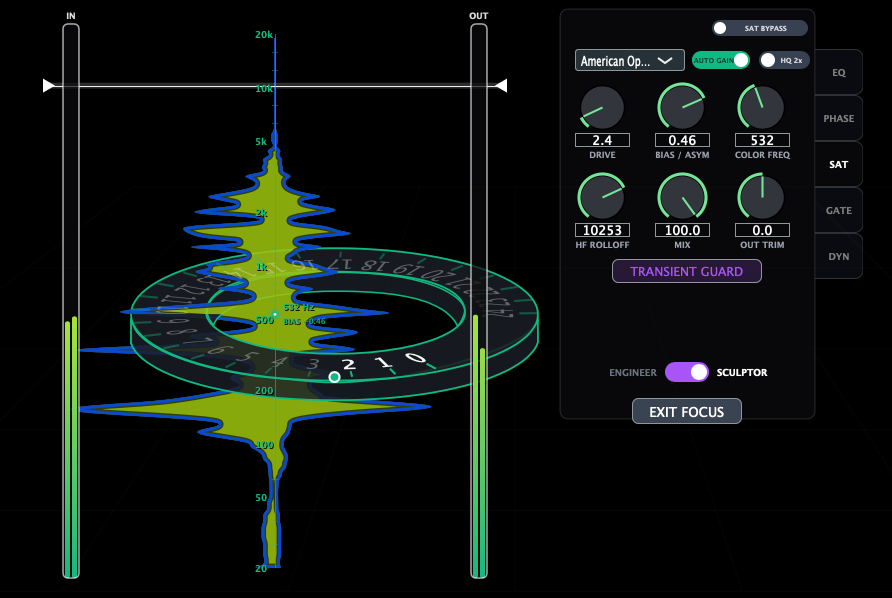
Built for the whole mix, not just one channel. Most console plugins model a single strip in exhaustive detail. That’s right for two or three hero tracks. It’s the wrong tool when you need an instance on every track in a 100-piece session, in real time, with zero added latency.
VisiStage doesn’t chase 1:1 circuit clones. It chases cohesion across the session — Analog Component Drift, Dynamic Slew Limiting, program-dependent release, and Proportional-Q — without external servers like AudioGridder that would break the shared 3D room.
Drive 0 to +24 dB, Bias/Asymmetry −1.0 to +1.0, Colour Frequency 20 Hz–20 kHz, HF Rolloff 1–20 kHz, Dry/Wet, Output Trim.
Toggleable polyphase oversampling plus profile-dependent analog speed limits for transformers, tape, and op-amps.
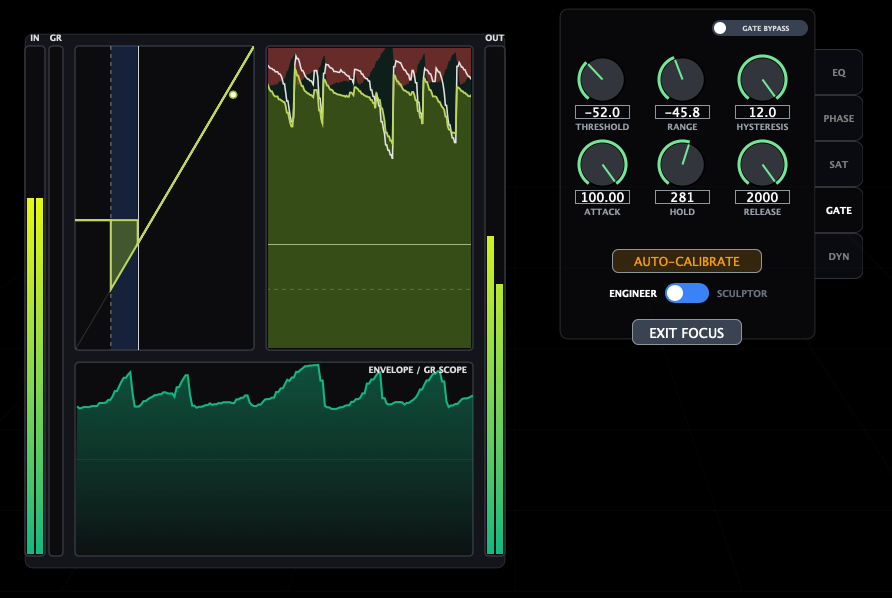
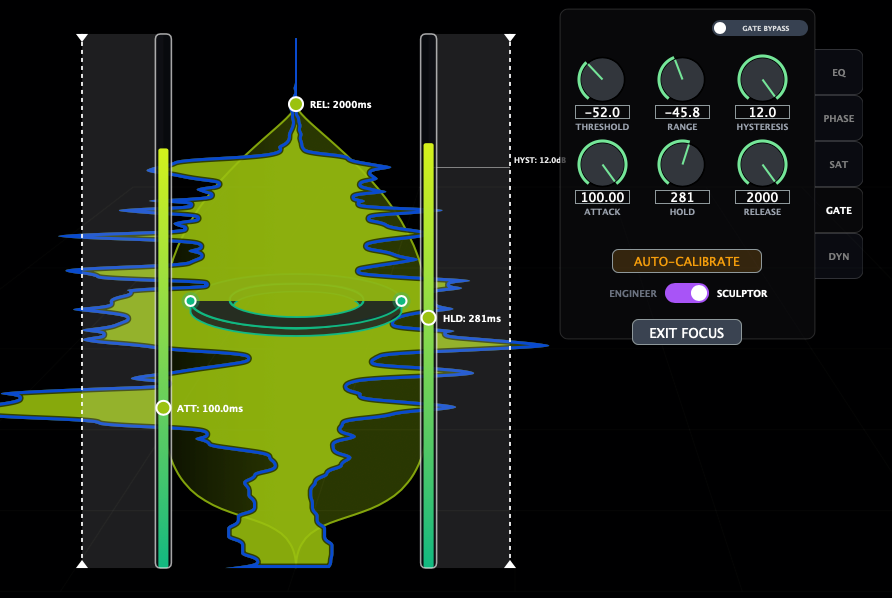
Threshold −80 to 0 dB, Range −80 to 0 dB, Hysteresis 0–12 dB, Attack 0.01–100 ms, Hold 0–500 ms, Release 10 ms–2 s.
In Sculptor mode, dual dashed outer jaws stop chatter on erratic sources.
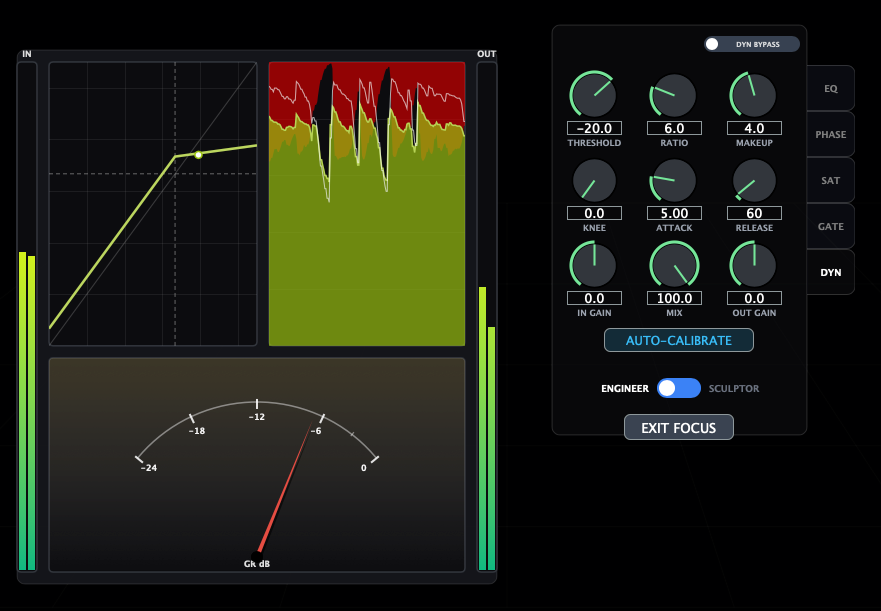
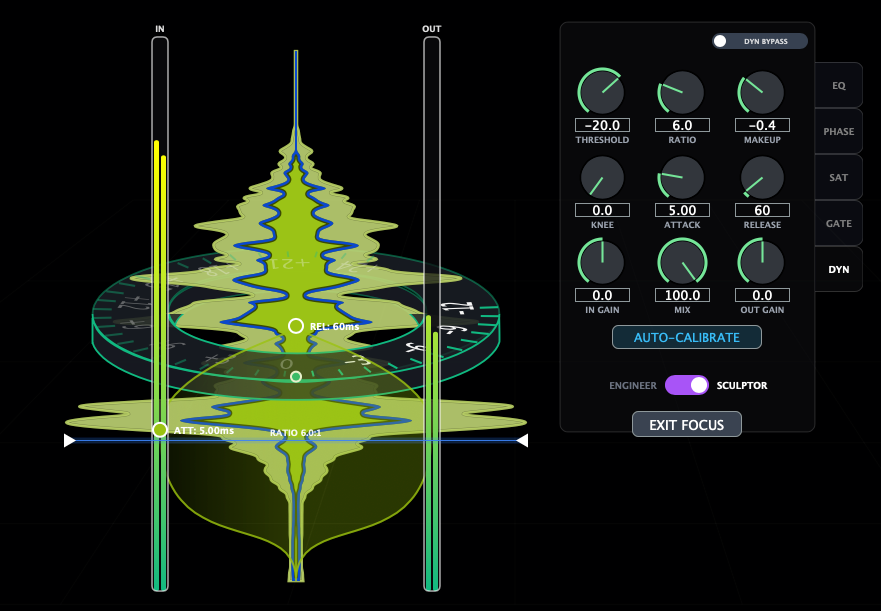
Threshold −60 to 0 dB, Ratio 1:1–20:1, Attack 0.1–100 ms, Release 10–1000 ms, Soft Knee 0–30 dB, Input and Output gain, Parallel Mix 0–100%.
Release lengthens under heavy GR so the compressor holds instead of pumping.
In Sculptor mode, drag the glass walls around the live meter to set threshold by feel.
03.5
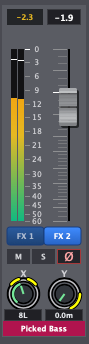
Need a second compressor, another EQ, or a dedicated sat stage on a track that already has VisiStage? Insert another instance down the same channel. Instead of cloning icons on the stage, fold them into one node — each earlier instance becomes its own [FX] button with an independent Focus Mode.
Tracks stay independent until you explicitly combine them. Nothing disappears on a guess.
Right-click to Combine to one Strip (enabled only when two valid instances are selected) or Split to New Strip.
The engine inspects true execution timing so the actual end-of-chain instance becomes Master.
Every chained instance keeps its own EQ, Dynamics, Gate, Saturation, and Phase. No crosstalk.
03.6
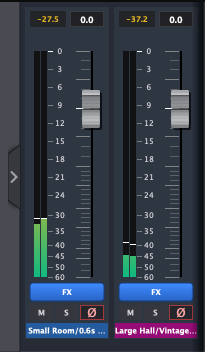
Drum buses, vocal buses, and returns aren’t physical sources — they’re summing points. Mark a track as a Bus and VisiStage lifts it off the 3D stage into a pinned dock beside Master, processing rack intact.
Right-click Bus Track on any non-Master, non-grouped strip. No name guessing, no auto-detect.
A darker blue-grey plate sits between the scrolling deck and Master. Collapse it sideways when you need canvas.
Colour, name, reorder, A–Z sort, mute/solo/CLR, and full Focus Mode all stay. X/Y knobs hide because a bus has no stage position.
Buses automatically leave the room engine. Un-bussing restores the previous isolation state.
04
A telemetry engine samples 1.5 seconds (90 frames) and applies deterministic DSP heuristics — starting points, not autopilot mixes.
EQ tab. Scans a 2,048-point spectrum and plants up to three −8 dB, Q=6.5 notches.
EQ tab. Reads 20–250 Hz energy and sets an HPF that keeps the fundamental and frees headroom.
EQ tab, multi-track. Compares the hero FFT to selected targets and carves a −3.5 dB pocket from 300 Hz–5 kHz.
DYN tab. Sets threshold, 2:1–3.5:1 ratio, 6 dB knee, and program-dependent attack/release from crest factor.
GATE tab. Measures noise-floor-to-peak gap for threshold, hysteresis, and release.
SAT tab. Protects pick snap and stick impact while setting drive, bias, and HF rolloff.
PHASE tab. Checks correlation, flips inverted polarity, and suggests all-pass rotation for mono compatibility.
05
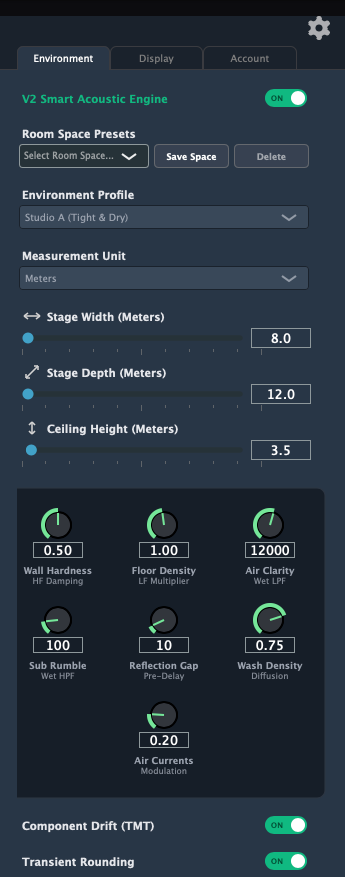
V2 comes with a whole new room physics engine to bring greater spatial accuracy and a better musical lush reverb engine. However, it is also fully backwards compatible with V1.
Click empty stage background to open the slide-out. The canvas squeezes so nothing is covered.
Switch seamlessly between legacy V1 3-tap spatial acoustics and the new V2 Smart Acoustic Engine for complete backward compatibility without breaking existing sessions.
Studio A, Stone Chamber, Concert Hall, Stadium, Ethereal, and more — each sets ceiling, reflection density, and damping.
Fine-tune room acoustics with dedicated knobs: Wall Hardness (HF Damping), Floor Density (LF Multiplier), Air Clarity (Wet LPF), Sub Rumble (Wet HPF), Reflection Gap (Pre-Delay), Wash Density (Diffusion), and Air Currents (Modulation).
Dial dimensions, room decay, absorption, and all 7 V2 reverb controls, then save the room for any session.
Stage from 8×12 m to 40×100 m. Ceiling 3–35 m. Units in metres, yards, or feet.
Sculpt wall hardness, floor density, wash diffusion, and air modulation currents to eliminate metallic ringing, prevent flutter, and tailor tail decay to any space.
06
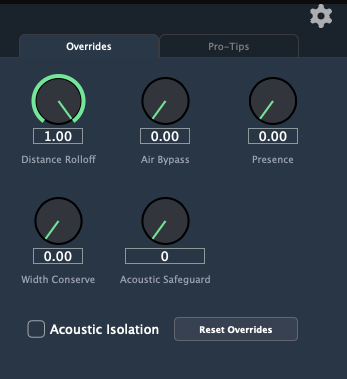
Select a node and the side panel becomes an expanded knob grid. Y-position is physical place. Acoustic Presence is mix focus.
Presence > 0.5 clamps rolloff, slows VCA attack up to 2.5×, adds up to +3.5 dB proximity saturation, and opens air.
Presence < 0.5 speeds attack down to 0.3×, absorbs above 6 kHz, and increases distance so the part slips back without touching the fader.
Shapes room response specifically for problem sources: Default / Auto, Kick/Sub (chokes low rumble), Snare/Perc (smoothens transients & boosts diffusion), and Pads/Lead (decouples tail attack via pre-delay & modulation).
Distance Rolloff, Air Bypass, Width Conserve, Acoustic Safeguard, Acoustic Isolation, and a one-click Reset.
07
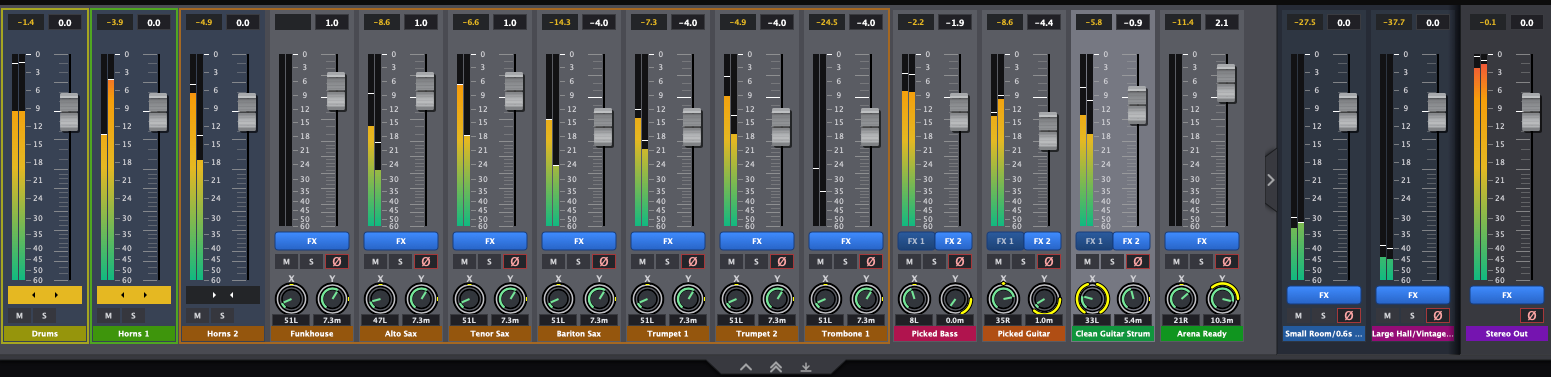

A high-density strip dock above or below the stage, locked to every canvas move.
0.1 dB precision, editable dB labels (-3.5, -inf), dual peak meters, latched 0 dBFS LEDs.
Inner cap = pan/depth. Outer rim = width and presence. Dedicated [FX], Mute, Solo, CLR.
Group Selected / Ungroup with relative offsets. Expand/collapse chevrons. Group colour tints children.
Group-aware A–Z sort, pinned Master plate, tri-state divider: top, bottom, 135 px mini-strips, or hidden.
08
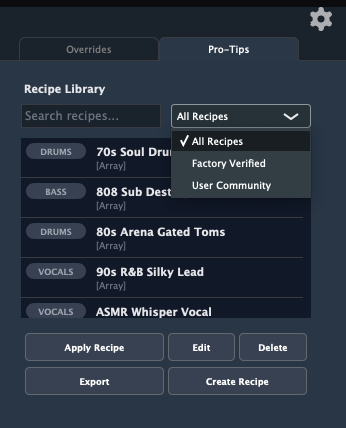
Encrypted .vsrecipe payloads store strip DSP, routing order, spatial coordinates, and author notes. Live Markdown preview in the library. Factory recipes ship inside the binary. Over 70 included — technique-driven starting points, not guaranteed results. They don’t include the instrument. Your source still has to show up. Below is just a few of them:
Intimate lead, dead centre, at the tip of the listener’s nose.
Uncomfortably close, high-frequency air, dynamics flattened.
Articulate and detached so it sits on top of heavy 808s.
Cuts boxiness, lifts intelligibility, levels jumps.
Explosive gated snare that punches and vanishes.
Four-on-the-floor designed to cut a dense electronic mix.
Hyper-compressed, highly EQ’d bus to blend under dry drums.
Phil Collins ‘In the Air Tonight’ energy, chopped off hard.
Glass-clean DI snap. No compromise on the transient.
Round, slightly woolly flatwounds into a vintage desk.
Wide alt-rock stacks. Thick, sustaining, present.
Subs locked centre, upper harmonics just peeking through.
Moody, underwater Toronto keys.
Ages a clean DI with tape weight and rolled-off top.
Wraps the listener and leaves the centre empty.
Inception-style brass-synth hit. Thick and immensely wide.
Low brass, taikos, impacts — a hall-sized sub wave.
Blockbuster hit designed to crack a theatre.
Alarm from across a foggy field. Depth and diffusion.
Bright, commanding, heaven-scale choir stack.
Competitive loudness without pumping away the transients.
Gentle VCA-style polish for the final bus.
Drop on master or drums for dusty TASCAM colour.
Turns white noise or a cymbal swell into a cinematic transition.
09

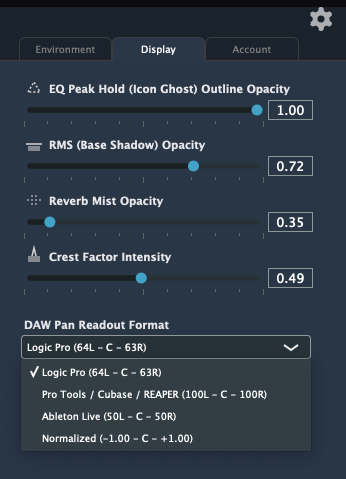
Freeze nodes to static icons and bypass visual FFT in GUI and audio engines when you want less motion.
Independent control of ghost outline, RMS shadow, reverb mist, and crest-factor intensity.
Logic 64L–C–63R · PT/Cubase/S1/REAPER 100L–C–100R · Live 50L–C–50R · Normalized −1.00–C–+1.00.
GUI and audio stay on separate threads. Delta filtering stops race conditions during multi-track drags.
Atomic snapshots on unregister. Zero-sample flushes from Cubase and Studio One handled cleanly.
Direct2D on Windows, Metal on macOS. Full DAW automation and Cmd+Z / Cmd+Shift+Z across stage, layout, and knobs.
© 2026 Yehaa Trading Trust (T/A VisiStage). All rights reserved. | Terms | Privacy Policy
Made in New Zealand

Powered by: Woo