lock

 To register on the visistage website/app you either need to use your exisitng Woo ID or create a new one (see below).
Sign Up
Why sign up?- Get access to Registered User's priviledges, which may include hidden pages, special features and special pricing, if they exist, on this website.
- Get access to all sites powered by Woo without having to enter your details everytime.
Sign In
Email Address (Woo ID) Password Forgot Your Password?User Name or Password is incorrect.
What is a Woo ID help
menu
.png)
shopping_cart
0
VisiStage Feature Specification & Architecture Guide
Next-Generation 3D Spatial Visual Mixer & Multi-Instance Acoustic Engine
1. The 3D Visual Stage Engine
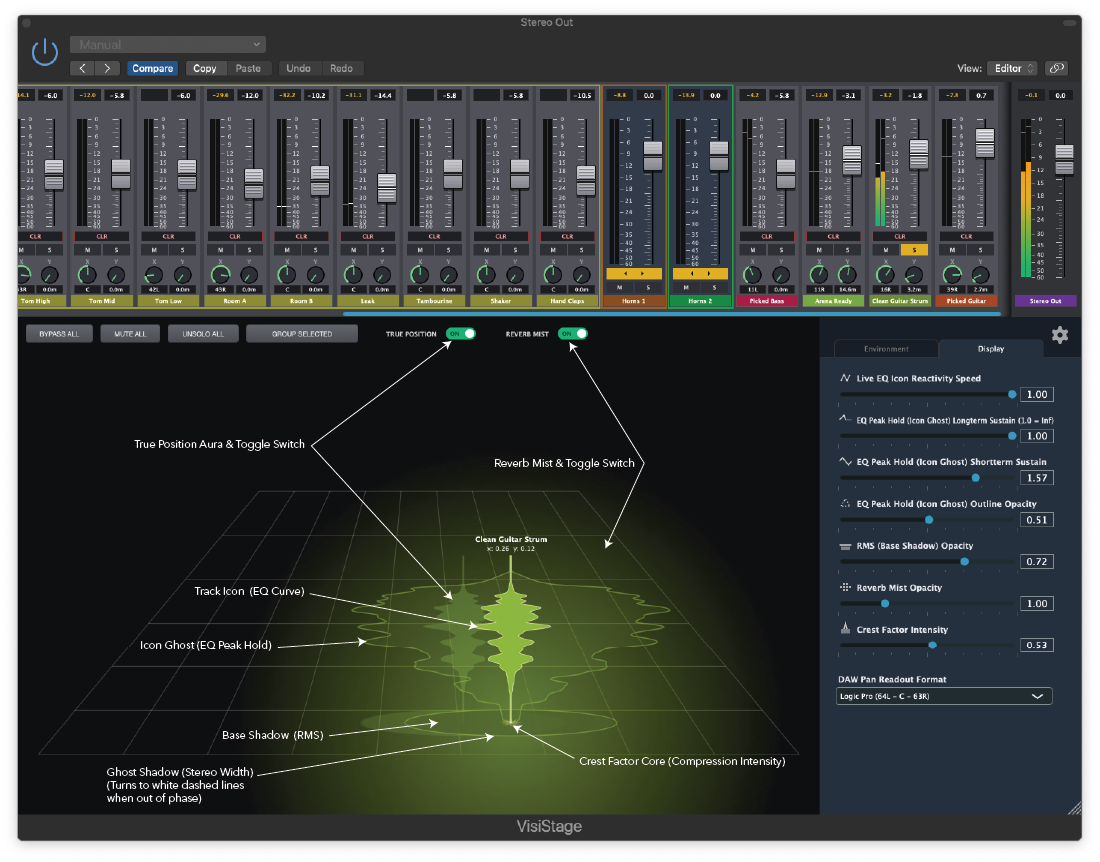
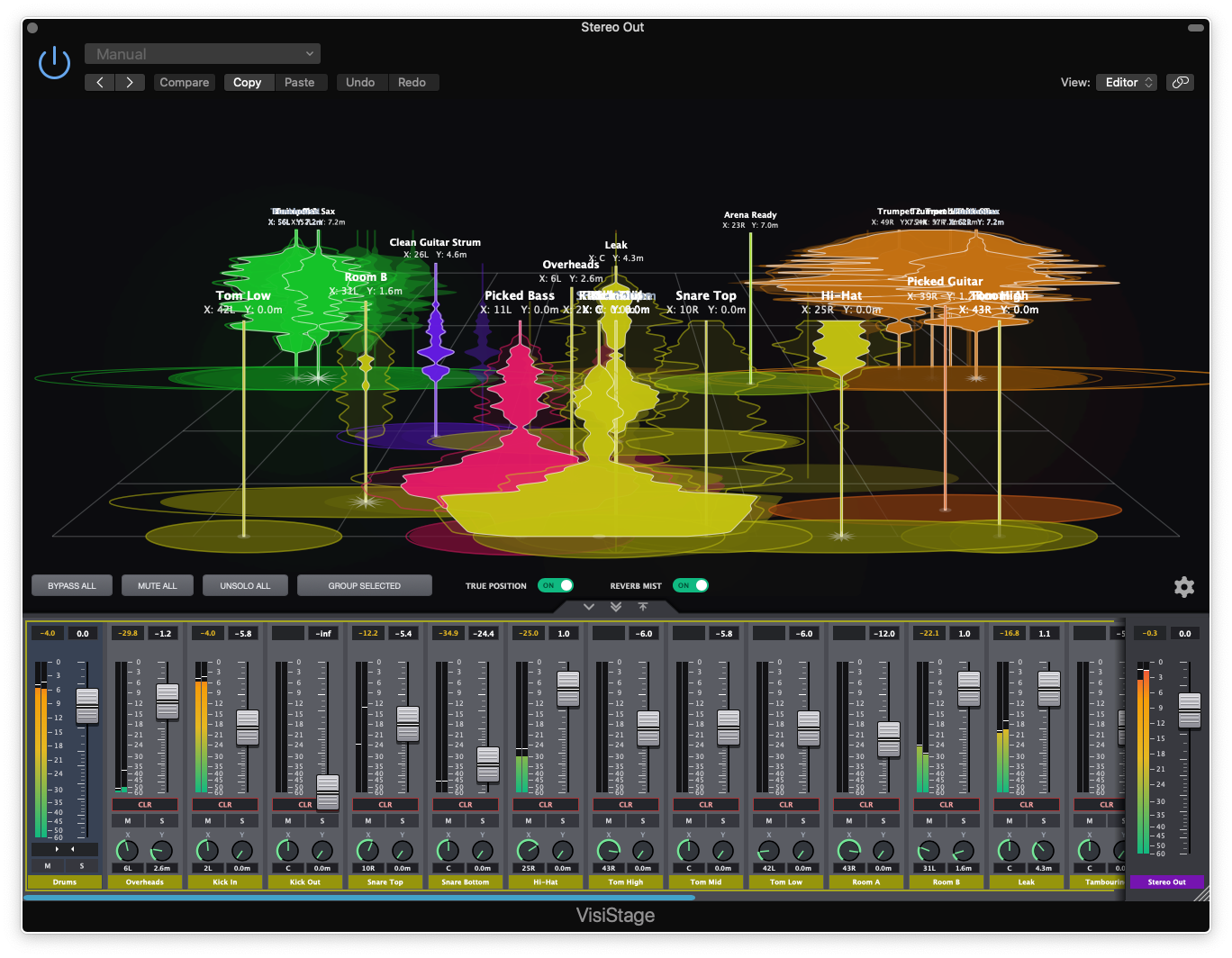
The central workspace of VisiStage is an interactive 3D perspective grid that maps your mix components as physical audio objects within a shared acoustic environment.
Spatial Coordinate Positioning
- Stereo Panning (X-Axis): Dragging track icons left or right sets the horizontal pan coordinates (-1.0 to +1.0) with psychoacoustic width expansion.
- Acoustic Depth & Proximity (Y-Axis): Dragging icons deeper into the grid (0.0 to 1.0) dynamically calculates distance attenuation, air absorption filtering, and early reflection timing.
- Live Coordinate Labels: Real-time numerical readouts
(y=Y.YY / x=X.XX)float above each track icon to display exact spatial coordinates on the stage floor. - Soundstage Expansion Engine: Scaling the Stage Scale slider past the "Studio" baseline (1.00) engages a spatial expansion algorithm that counteracts depth perspective compression, keeping hard-panned instruments anchored wide at the wings even deep in the room.
Real-Time Reactive Spectrum Icons & Telemetry
- Track Icon (Live EQ Curve): A solid real-time 64-bin FFT spectrum shape that expands horizontally around the instrument node to show active playback frequencies.
- Icon Ghost (Peak Hold): A translucent outer envelope surrounding the live icon that captures and holds frequency peaks, revealing the maximum spectral width and historical footprint of the track.
- True Position Shadow: A live contextual aura displaying where the signal is actually sounding in real-time stereo space (calculated via live audio pan analysis) versus its manual coordinate placement. Can be toggled on/off via the TRUE POSITION switch.
- Icon Shadow (RMS) & Stereo Width Ghost Shadow: The solid inner floor disk represents low-frequency RMS energy weight, while the expanding outer ring visualizes side-channel stereo width (collapsing into a white dashed outline if phase correlation drops below zero).
- Crest Factor Core (Compression Intensity): Central starburst geometry that flashes and expands based on the dynamic crest factor (peak-to-RMS ratio), providing instant visual feedback for transients and dynamic compression.
- Reverb Mist Haze: Contextual ambient floor haze drawn behind distant sources proportional to local reflection energy propagation. Can be toggled on/off via the REVERB MIST switch.
Stage Canvas Tools & Selection
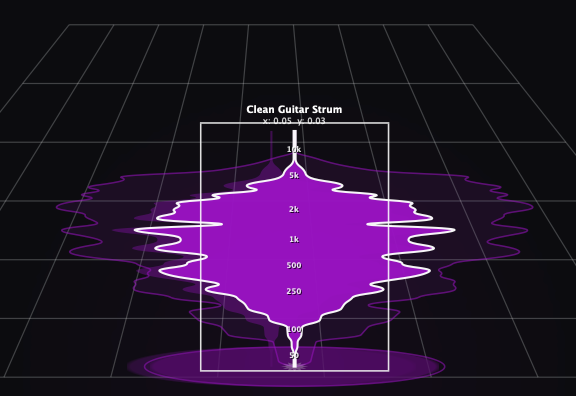
- Selection Box: A white targeting frame that appears around selected icons. Dragging inside the box moves the icon across the stage, while dragging the left or right edge handles scales the track's volume.
- EQ Frequency Markers (50Hz to 10kHz): Rendered directly inside the active Selection Box along the vertical height of the icon (from 50 Hz at the base up to 10 kHz at the tip) for precise spectral energy reference.
- Intuitive Multi-Selection: Click to focus a single instrument, use
Cmd/Ctrlto cherry-pick custom groups, or holdShiftto highlight entire sections instantly. - Lasso Drag Tool: Click and drag on the empty stage floor to draw a marquee box over a cluster of tracks.
- Proportional Headroom Drag: Holding
Shiftwhile dragging the outer volume handle of one selected icon scales the gain of all currently selected tracks simultaneously.
2. Global View: The Acoustic Universe
Accessible in the slide-out settings panel when clicking the background of the 3D Stage (no track icon selected). Opening the panel automatically resizes and squeezes the 3D stage canvas so no icons or stage labels are obscured.
Environment Profile Engine (Dropdown Selector)
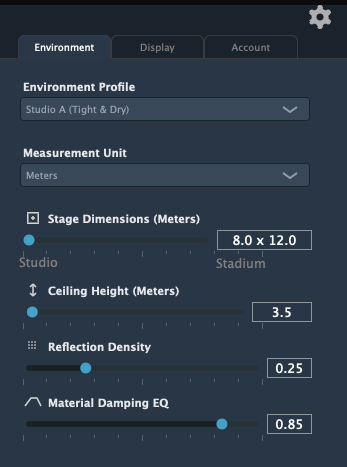
Defines the internal wall geometry, boundary absorption, and early reflection routing of the shared room model:
Rooms & Ambiences
- Studio A (Tight & Dry): Heavy acoustic absorption, minimal reflections.
- Studio B (Wooden Live Room): Warm mid-frequency scattering with natural wood resonance.
- Stone Chamber: Bright, immediate energy buildup with hard surface wall reflections.
Halls & Stages
- Concert Hall: Balanced, wide symphonic space with deep stereo image propagation.
- Scoring Stage: Optimized for complex cinematic orchestral layer separation.
- Stadium / Arena: Massive, hollow boundary walls with long initial echo gaps.
Creative Spaces
- Cathedral: Soaring vertical dimensions with long mid-low frequency decay texturing.
- Cavern / Cave: Deep, heavily low-pass filtered early acoustic boundaries.
- Ethereal Space: Frequency-modulated, shifting reflection tails for creative soundscapes.
Universe Dimensions & Scale
- Measurment Unit (Meters, Yards, Feet): Select the measurement unit that suits you for Stage Dimensions and Ceiling Height.
- Stage Dimensions (8.0m x 12.0m to 40.0m x 100.0m): Master spatial control scaling the room's physical footprint and boundary echo timing from Studio to Stadium scale. Adjusting this automatically updates the individual Y-axis depth meters on the console deck in real-time.
- Ceiling Height (Slider: 3.0m to 35.0m): Direct multiplier for vertical early reflection time-of-arrival, widening vertical acoustic perception.
Room Mechanics & Absorption
- Reflection Density (Slider: 0% to 100%): Controls how quickly discrete wall echoes diffuse into a smooth reverberant block.
- Material Damping EQ (Slider: 0% to 100%): Dictates high-frequency absorption within room boundary reflections (simulating concrete vs. thick fabric acoustic damping).
3. Track View: The Object Overrides
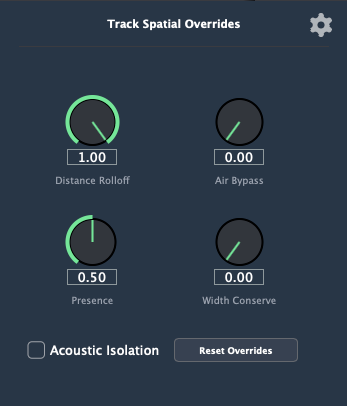
Visible in the side panel when an individual track icon is selected, transforming the layout into a focused 2×2 rotary knob grid.
Distance Physics Overrides
- Distance Rolloff: Overrides natural acoustic volume drop-off over distance. Lowering this setting keeps deep background elements loud, present, and steady in dense mixes.
- Air Bypass: Scales down the cumulative high-frequency air loss filter, ensuring bright instruments (cymbals, acoustic guitars, vocal air) stay pristine regardless of stage depth.
Soundfield Geometry
- Source Acoustic Presence (Direct ↔ Diffuse): Adjusts the energy blend ratio between the direct dry signal firing at the listener and diffuse diffusion into the room reflection network.
- Width Conserve: Prevents stereo image collapse over distance, allowing wide stereo synthesizer patches or drum overheads to maintain full width at the rear wall.
Track Context Actions
- Acoustic Isolation (Toggle): Decouples the track entirely from the global room reflection engine, turning it into an isolated dry point source.
- Reset Overrides (Button): Prompts a confirmation dialog to instantly reset distance rolloff, air bypass, presence, width conservation, and isolation back to factory defaults without affecting DAW volume faders.
4. Console Deck & Mixing Engine
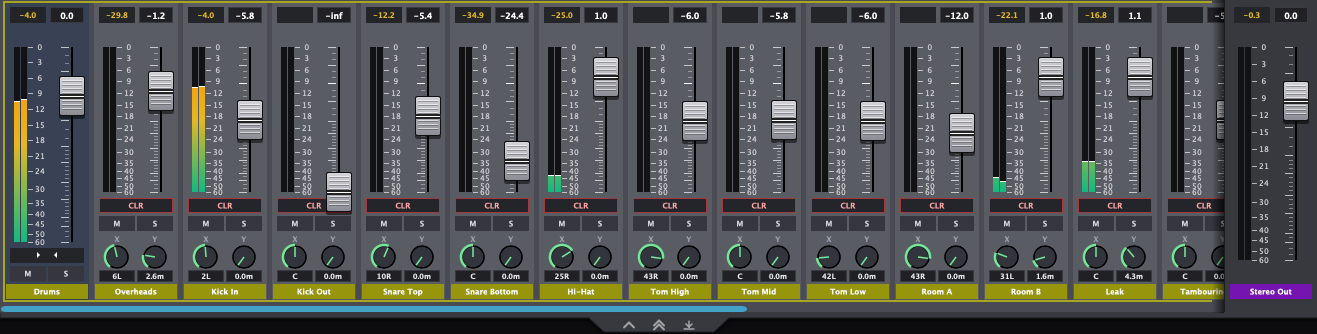
A high-density channel strip dock sitting above the 3D Stage canvas for unified mixing deck control, perfectly synchronized with stage movements.
Precision Fader Strips & Dual Peak Meters
- Logic-Calibrated Logarithmic Faders: Smooth fader feel calibrated to Logic Pro taper standards with 0.1 dB dragging precision.
- Numeric dB Readout Labels: Editable labels above each fader display rounded numerical gain levels and accept manual typing (e.g., typing numbers or
-inf). - Dual Stereo Peak Meters: High-resolution LED-style gradient meters featuring 90-tick peak hold indicators.
- Latched Overload LEDs: Numerical peak overshoot indicators that latch when exceeding 0.0 dBFS (click to clear).
- X/Y Spatial Coordinate Knobs: Mini rotary pots at the base of independent channels precisely control the track's 2D placement. The X-axis readout automatically formats to match your preferred DAW's native panning scale (e.g., Logic, Pro Tools, Ableton), while the Y-axis provides a dynamic physical depth readout in meters synced to your active Stage Scale.
- Mute (M), Solo (S) & Clear (CLR): Channel strip mute/solo logic with dedicated CLR buttons on independent channels to reset pan and proximity coordinates.
VCA Grouping System
- Group Selected / Ungroup: Combine multiple selected channels into a unified VCA Group Master strip featuring relative group gain offset controls.
- Expand / Collapse Chevrons: Integrated chevron buttons (
< >/> <) on Group Master strips fold away child tracks to conserve screen space. Unified Group Customization: Double-click or right-click group headers to assign custom names and unique colors. Assigning a color to a Group Master instantly cascades to tint all of its assigned child tracks for seamless visual organization.

Right Click Context Menu
Pinned Master Dock Plate
- Master / Stereo Out Isolation: The main DAW Master/Stereo Output track is automatically detected and pinned to an isolated dark-gray dock plate on the far right edge.
- Drop-Shadow Divider: Visual separation ensures master outputs are strictly isolated from channel grouping, strip reordering, or global mute-all commands.
Console Navigation & Global Deck Actions
- Horizontal Scroll & Arrow Navigation: Drag directly on the deck or use keyboard Left and Right arrow keys to scroll through high track counts.
Global Toolbar Actions: One-click master controls for BYPASS ALL (dry system comparison), MUTE ALL, and UNSOLO ALL across all plugin instances.

Minimize/Hide/Move Fader Strip

- Minimize/Maximize Chevron: Click on the chevron at the bottom of the fader strip to show or hide the faders and meters. You still have full control to select tracks, mute, solo and control the X/Y positions, as well as Clear All Track Settings. In this way you get extra screen real-estate, without losing the ability to keep refining your mix.

- Hide/Show Double Chevron: Click on the double chevron at the bottom of the fader strip to show or hide the whole fader strip.
- Move Fader Strip: Click on the down/up arrow to move the fader strip to the bottom/top of the window.
5. Display & Visual Customization Engine
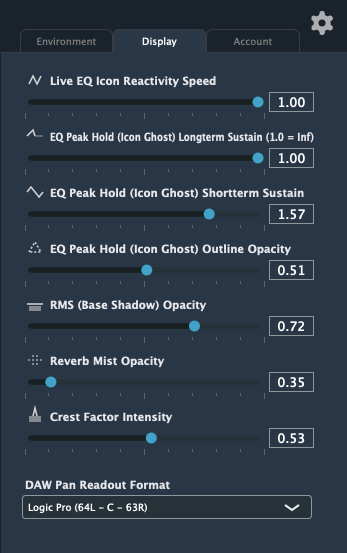
Accessible via the "Display" tab in the Global Settings panel to fine-tune graphics performance and visual responsiveness.
- Live EQ Icon Reactivity Speed (Slider): Adjusts response smoothing for real-time spectrum tracking and node movements.
- EQ Peak Hold Sustain & Decay (Sliders): Controls short-term breathing pulse (breathe speed) and long-term peak hold decay of the icon spectrum ghost envelopes.
- EQ Peak Hold (Icon Ghost) Outline Opacity (Slider): Adjusts the transparency of the peak-hold FFT spectrum outline.
- RMS Base Shadow Opacity (Slider): Controls floor shadow disk density under active instruments.
- Reverb Mist Opacity (Slider): Adjusts the transparency and density of the 3D background room reflection haze.
- Crest Factor Intensity (Slider): Scales the visual size and expansion sensitivity of the central crest factor dynamic core.
- DAW Pan Readout Format (Dropdown Selector): Customizes the numerical display and text-input parsing for the X-axis (pan) coordinate knobs on the Console Deck to automatically match your primary DAW's native panning scale. Options include:
- Logic Pro: 64L – C – 63R[cite: 23]
- Pro Tools / Cubase / REAPER: 100L – C – 100R[cite: 23]
- Ableton Live: 50L – C – 50R[cite: 23]
- Normalized: -1.00 – C – +1.00[cite: 23]
6. Core Engine Architecture & Workflow Integrations
Multi-Instance Cross-Talk Registry
- Central Telemetry Hub: A 60Hz lock-free, triple-buffered registry unifies all VisiStage instances across separate DAW tracks into a single coordinated mix universe.
- Zero-Latency Audio Threading: Audio buffer processing (`processBlock`) operates lock-free with zero memory allocation, ensuring non-blocking audio performance.
Sleek Custom UI Styling
- Dark Slate Aesthetics: Polished dark-mode color scheme with high-contrast text and custom-styled LookAndFeel components.
- 96-Color Palette Picker: Integrated 4×24 color matrix swatch window with a "Default" reset button to assign custom colors to track icons, strip footers, and group boundary boxes.
- Modern Dark Context Menus: Styled right-click popup menus for rapid track renaming and color palette access.
Full DAW Automation & Session Persistence
- Bi-Directional Host Sync: All spatial parameters (Pan, Proximity, Gain, Mutes, Physics Overrides) map directly to host DAW parameters for full automation recording and playback.
- Timestamped Layout Recovery: Console order, group definitions, custom colors, and track names automatically persist and recover cleanly across DAW project reloads.
- Complete Transaction Undo / Redo: Full support for keyboard shortcuts (
Cmd+Z/Cmd+Shift+Z) across stage dragging, layout reordering, and fader moves.
Made in New Zealand

Powered by: Woo